For artist, tour and production managers

Every artist.
Every show.
In its place.

Manage your artists, advance a tour or coordinate a production. Keep shows, deals, budgets, travel and the people doing the work connected, in the right organisation and artist workspace.

Explore the workflow Get the launch email ↗
Desktop app preview. Demonstration data.
From the production office to the crew call.ORGANISATIONS / ARTISTS / SHOWS

Two artists.
Different plans.

Managing more than one artist or working across organisations? Choose whose work you are opening, then the tour or production. Keep each artist’s shows, people and details together. Non-artist projects have a place, too.

Northline Touring / Lena ValeInteractive illustration

The Nightlight Tour

Main Stage

Friday · Show day
09:00Crew load-inLoading dock
13:00SoundcheckMain Stage
18:00DoorsFront of house
19:30Lena ValeMain Stage

Calls, timings and practical details belong to this production.

Try the organisation, artist and section controls. This is a website illustration with fictional information, not a live app or an app screenshot.

Know where you are. Organisation and artist context stays visible while you work.

Keep access clear. Company work requires an online access check when you open it. Personal work remains available offline.

Less hunting.
More advancing.

Useful suggestions while you type. Open questions you can find. Travel details attached to the people who need them.

Start typing.
See your options.

Venue and hotel suggestions appear as you enter a name. Use the keyboard to choose a result, reuse saved details, or keep typing your own entry.

Plan multiday stays across different hotels, allocate rooms by name and prepare a rooming list for the property.

See what the crew receives

Try a sample hotel search

Type a name. Use ↑ ↓ and Enter to choose.

Suggestions use fictional hotels. This does not make a booking.

The technical advance

Find the questions
still waiting on an answer.

See what is open, build reusable question layouts and carry saved venue facts into blank fields. Keep rider versions, imported conversations and responsibilities with the production.
People and travel

The right room.
The right person.

Bring crew, travel movements, stays and room allocations together. Work across dates and properties without losing track of who belongs where.

Production finance

What is planned.
What has actually happened.

Compare estimated and committed costs, allocate responsibilities and track received payments, outstanding balances and cash flow alongside the deal and contracts.

Show-day planning

From the first call
to the last cue.

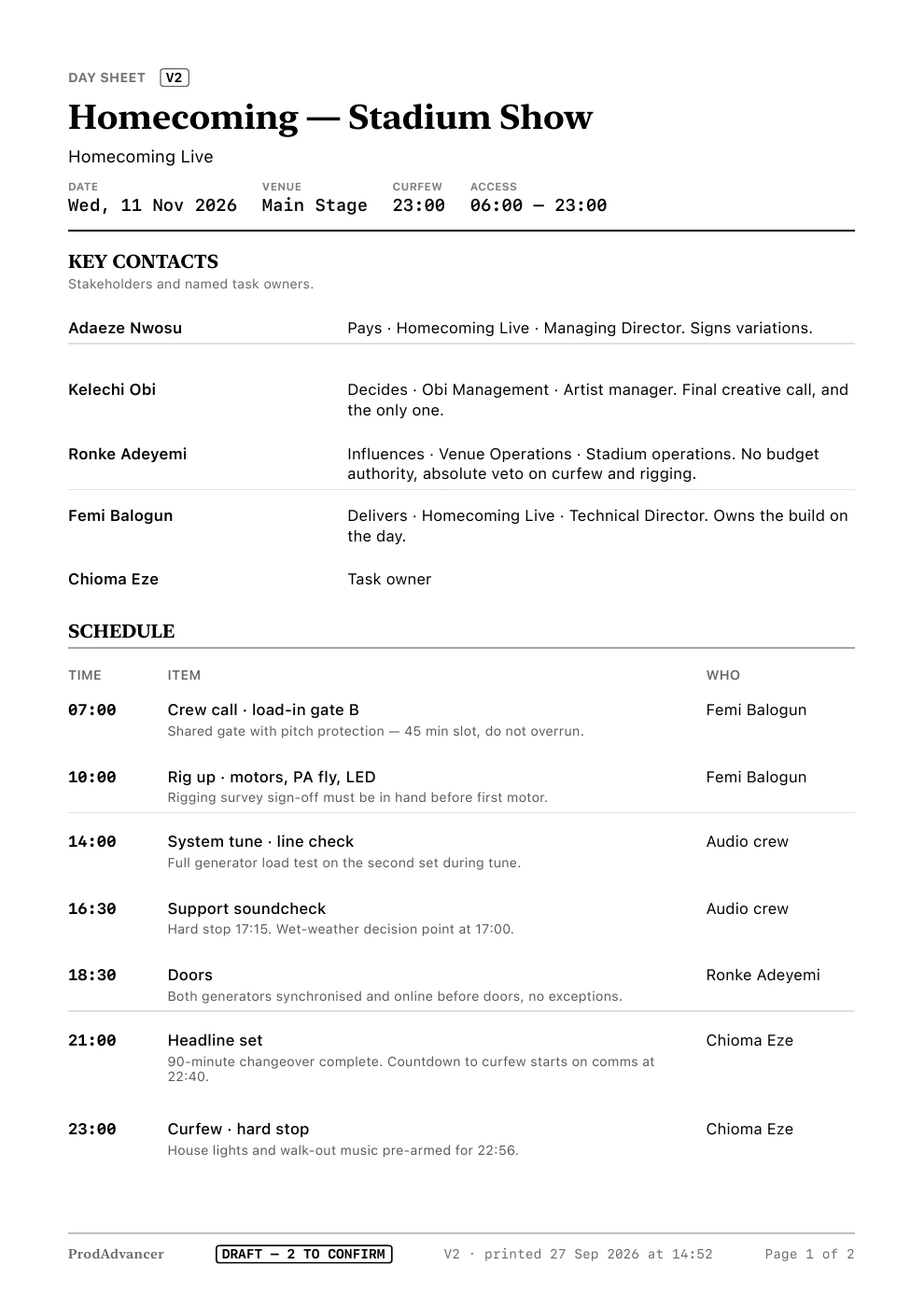
Keep the schedule, crew calls, contacts, set timings and cue details in the production. Turn the working information into a daysheet people can use.

Working safely

Review the change.
Then make it.

Save or cancel drafts, preview what a bulk action will affect and use Undo when you need to recover a change. Review what a backup contains and what will be restored before you apply it.

Company identity

Your work.
Your organisation.

Keep organisation branding and production details together. Reuse the right company context across artists, venues, tours and non-artist projects.

ProdAdvancer Crew

The show day,
on your phone.

Working across tours? Your organisation, artist and tour stay visible. See the issued plan for your role and the revisions that matter to you.

Switch to the right tour.
Choose from the organisations and tours you have access to, without signing out for every job.
Read the plan meant for you.
Open your issued daysheet, calls and practical details. Crew copies follow the audience selected by production.
See the revision. Acknowledge the change.
Review changed timings and updates. Acknowledgement is confirmed when the service accepts it.

An internet connection is required to open company work and confirm your current access.

Coming soon for iPhone, iPad and Android.

Different organisations. One sign-in. ↗
Your issued plan, with changes visible. ↗

Actual iPhone simulator captures from the latest acceptance build. Fictional demonstration data.

When it’s show time

The right plan.
For the right people.

Choose the audience, review the pack and publish a numbered revision. Keep older issued copies intact as the working plan moves on.

Control guest-facing information and crew access. Export a daysheet PDF or issue the selected crew pack to the mobile app.

Example daysheet shown for preview.

THE PLAN, IN HANDPREVIEW
A real exported sample daysheet with event timings and production information.
A real draft export, shown with demonstration data.

Your artist.
Your tour.
Your production.

For artist managers.

Keep each artist’s shows, deals, production budgets and travel in view. Coordinate with the tour and production team as the plan develops.

For tour managers.

Bring dates, movements, hotel stays and room allocations together. Keep the touring party clear on where they need to be.

For production managers.

Work through the technical advance, crew calls and show schedule. Prepare the right published plan for the people delivering it.

ProdAdvancer + ProdAdvancer Crew

Coming soon.

For your next artist.
And the show after that.

Get the launch email.

ProdAdvancer and ProdAdvancer Crew are in development. This is a product preview; the apps are not yet available to download.

Enlarged ProdAdvancer demonstration workspace